
DNS lookup: see every record a domain publishes
How does this check work, and what does the result tell you?
Look up A, AAAA, MX, TXT, NS, CAA and other DNS record types for any domain over DNS-over-HTTPS, with each type explained, using Cloudflare's public resolver through an AdminKit Pages Function that validates the query, times it out after 3 seconds, and caches each distinct result for 60 seconds.
Part of the DNS cluster — more tools, guides and terms on dns.
AI explanation Run a check below, then sign in to ask AI to explain the result in plain language.
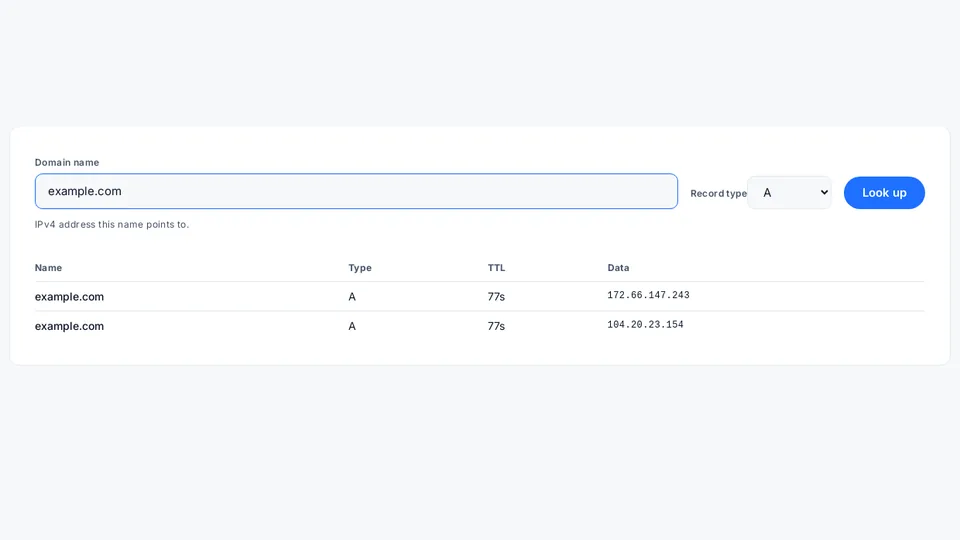
IPv4 address this name points to.
What the result means
An empty result most often means that record type is not published for this name, not that the domain does not exist — try A or NS to confirm the domain resolves at all.
Next step
Check the domain's mail servers or look up who registered it.
Keep this result
Copy a link to this check so you can share it or run it again later. Want a heads-up when this result changes? Talk to our team and we'll set it up for you.
How it works and limits
This tool queries Cloudflare’s public DNS-over-HTTPS (DoH) resolver (cloudflare-dns.com,
RFC 8484) on your behalf through an AdminKit Pages Function, rather than
calling DNS servers directly from your browser. The function validates the domain name and record type before
forwarding the query, times the upstream lookup out after 3 seconds, and caches each distinct name + type pair for
60 seconds. The function uses the JSON form of that resolver’s DoH API, which Cloudflare documents in its
DNS over HTTPS request guide.
Supported record types
A and AAAA resolve a name to an IPv4 or IPv6 address, and NS lists the authoritative name servers for a zone, as defined in RFC 1035. CNAME is an alias to another name. MX, TXT, CAA, PTR and SOA are explained on their own tool pages or inline next to each result. Every record type’s name and numeric code is assigned in IANA’s Resource Record (RR) TYPEs registry. If a lookup here shows no CAA record, AdminKit’s CAA record generator builds one restricting which certificate authorities may issue for the domain. If the TXT record you are checking is an SPF, DKIM or DMARC policy, see SPF, DKIM and DMARC explained for what each one does and how to read it.
How to read the results
- Name — the name the answer belongs to, without the trailing dot. If the name you typed is an alias, the first row can be a CNAME for your name, followed by rows for the name it points to.
- Type — the record type of that row (A, AAAA, MX, TXT, NS, CAA, SOA, CNAME or PTR). The short line under the type picker says what the selected type controls.
- TTL — how many seconds a resolver may cache this answer before asking again. Cloudflare’s resolver reports the time left in its own cache, so the number can be lower than the TTL set in the zone.
- Data — the record’s value as the resolver returns it: an address for A/AAAA,
priority hostfor MX, the quoted text for TXT,flags tag "value"for CAA, and the primary server, admin mailbox, serial and timers for SOA. - “No records of this type were found for this name.” — the lookup worked but returned nothing of that type (see the FAQ below). Any other message (invalid name, rate limit, upstream timeout) means the lookup itself did not run.
Examples
| Lookup | Typical answer | What it means |
|---|---|---|
example.com A | example.com A 300s 192.0.2.10 | The name points to one IPv4 address, cached for up to 300 seconds. |
example.com MX | 10 mail.example.com. and 20 mail2.example.net. | Mail goes to the priority-10 host first; the priority-20 host is a fallback. |
example.org TXT | "v=spf1 ip4:198.51.100.0/24 -all" | An SPF record: only that range may send mail as example.org. |
example.net AAAA | No records of this type were found | The name has no IPv6 address (or the name does not exist). |
example.com CAA | 0 issue "letsencrypt.org" | Only that certificate authority may issue certificates for the domain. |
The answers above use documentation addresses (RFC 5737, RFC 3849) and reserved example domains to show the format; a live lookup returns whatever the domain really publishes.
Limits
- Only the record types listed above resolve; anything else is rejected before it reaches the upstream resolver, including newer types such as SVCB/HTTPS records, which this tool doesn’t support yet — see how to read an SVCB/HTTPS DNS record for what one looks like and how to check it manually today.
- Results reflect what Cloudflare’s resolver sees at query time — different resolvers can briefly disagree during DNS
propagation after a change. To compare against a second resolver, Google Public DNS documents its own
JSON API for DNS over HTTPS, which takes the same
nameandtypequery parameters. - No query is logged; see /legal/privacy/ for what this tool processes.
- A lookalike domain can resolve perfectly cleanly here — valid records don’t mean the domain is the one you think it is, so if a name looks slightly off, check its characters with AdminKit’s IDN homograph check before trusting it.
If a change doesn’t seem to have taken effect yet, see DNS propagation and TTL explained for what controls the delay. See how to read a DNS lookup result for what each record type in the output means. See how this tool compares to Dig Web Interface if you need a wider set of record types or a specific nameserver instead. Reference: DNS, NS record, CAA record.
See best free DNS lookup tools for how this tool’s nine-record-type, single-resolver approach compares to MXToolbox, Google’s Admin Toolbox Dig, nslookup.io and intoDNS.
Frequently asked questions
Which record types are supported?
A, AAAA, MX, TXT, NS, CAA, PTR, SOA and CNAME.
Why do I need a TXT record check?
TXT records carry SPF, domain verification and other machine-readable policies — a wrong one silently breaks mail or verification.
Why do results change a few minutes after I update a record?
Resolvers cache each record for the duration of its TTL (time to live), so a change can take anywhere from seconds to the old TTL's full length to be visible everywhere, including here.
Can I look up any domain, or only ones I own?
Any domain — DNS records are public by design, published so any resolver on the internet can read them. This tool does not require or check ownership.
What does "No records of this type were found" mean?
Cloudflare's resolver answered, but returned no record of the type you picked for that name. Either the name exists without that record type (for example a domain with an A record but no AAAA), or the name does not exist at all — this tool shows both cases with the same message. Try another type, or check the spelling of the name.